SUPER-VISION.AI
Agent ERP · Critical Operations Hub

See what matters. Act in time.

Super-Vision is Agent ERP for operations that cannot stop. Your people record what happens on the floor. AI agents work out what it means and prepare the next step, whether that is an order, a roster, a permit or a repair. You approve it.

It covers

It notices

It proposes

Agent ERP · a new generation of ERP

Workers capture. Agents coordinate. You stay in control.

The records your business runs on, built so people and AI agents can work on them together. Pick an industry and follow one piece of work from the floor to the finish.

01 · Capture

On the floor

02 · Reason

The agent

The agent uses the same business tools your staff do to check the facts, then prepares the next step.

03 · Approve

You

Awaiting approval

You see the proposal and the reasons behind it. Nothing that matters moves without a person.

04 · Coordinate

The follow-through

One approval carries the work through every record it touches, and keeps them tied together.

What it runs

Not only machines. The whole working day.

A failing pump is one kind of work. Most of the day is orders, people, paperwork and money. The same agents and the same approvals run all of it.

Supply

Purchasing and stock

  • Counts that become orders
  • Deliveries checked against the order
  • Transfers between sites
Customers

Orders and delivery

  • Delivery dates you can keep
  • Changes re-planned in minutes
  • Customers told before they ask
Production

Planning and scheduling

  • Plans matched to materials
  • Slots, docks and berths booked
  • Clashes caught before the day
Assets

Maintenance

  • Early warnings, not alarms
  • Work orders with parts and people
  • Life and cost of every asset
People

Rosters and crews

  • Gaps filled by qualified staff
  • Rest hours and licences checked
  • Overtime recorded as it happens
Safety

Permits and compliance

  • Permits checked against live work
  • Certificates tracked to expiry
  • Inspections that close themselves out
Commercial

Contracts and invoices

  • Invoices checked line by line
  • Charges raised from the work done
  • Claims prepared with the evidence
Finance

Cost and revenue

  • Cost booked where it was incurred
  • Revenue by site, branch or voyage
  • One picture for the month end
One finding, six records · 0 alarms · 1 advisory

Nothing is wrong. Yet.

The same thing works on machines. Every reading is inside its limit, so the alarm panel is silent. The agent has already seen the failure coming and prepared the response. One approval moves the load, books the repair and drafts the paperwork. Step through it.

The sensors

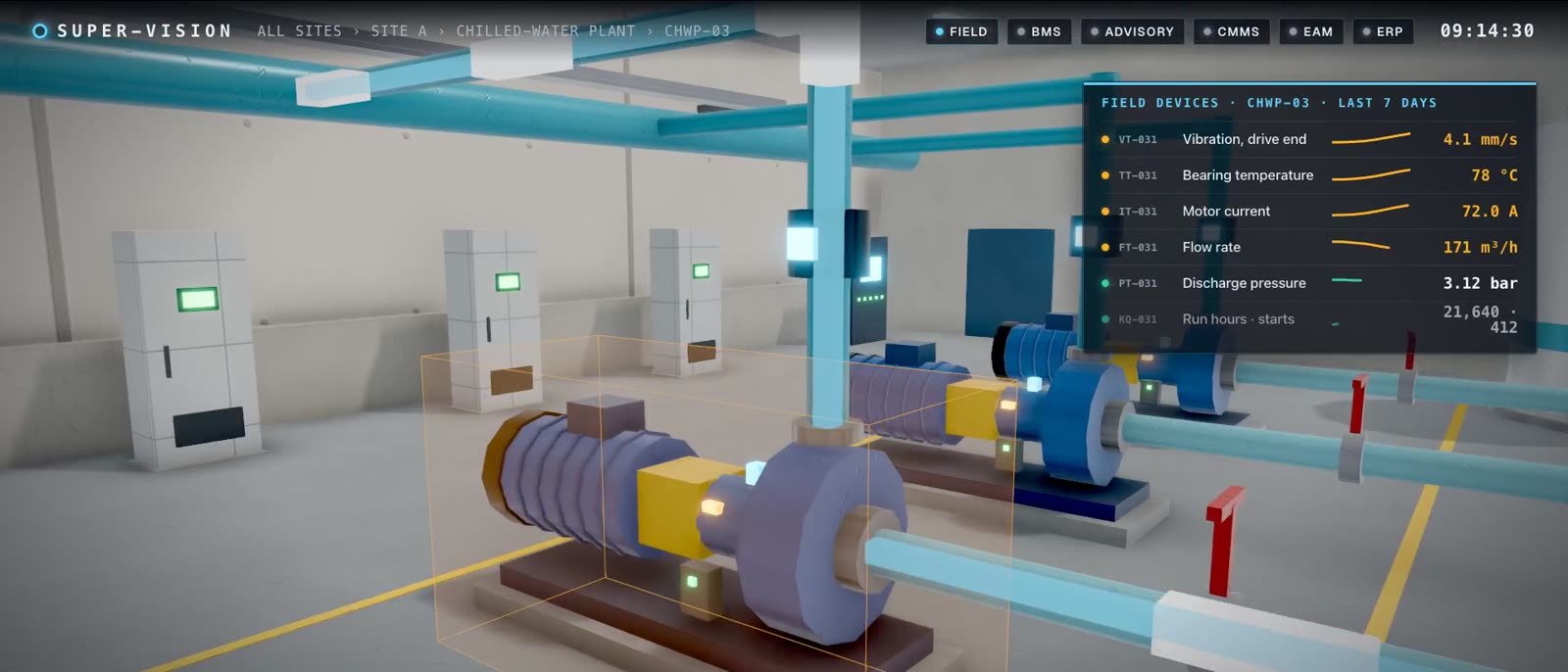
Chilled-water plant1 / 6
What it sees

Three readings. Your panel shows one.

A machine can be switched on, wearing out and falling short all at once. Super-Vision tracks the three separately for every asset.

Status · is it on?Running

What a control system reports. True, and not the whole truth.

Condition · is it healthy?Degrading

Vibration and bearing temperature rising for a week, still under the alarm line.

Performance · is it doing its job?Below target

Flow has slipped below what the building needs from this pump.

The digital twin

From the whole portfolio to one bearing.

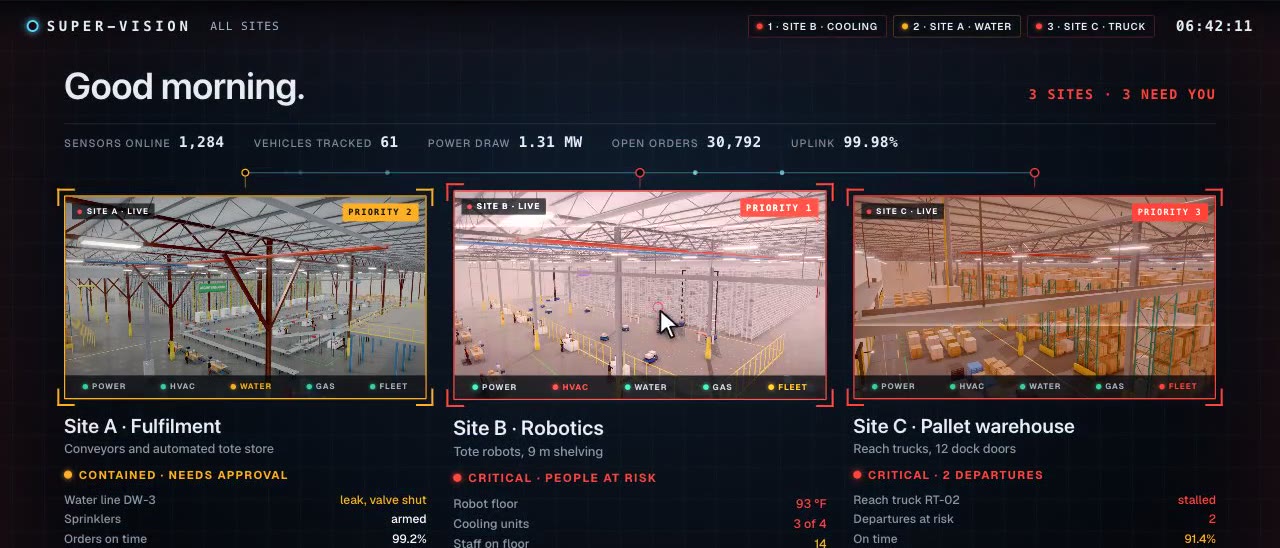
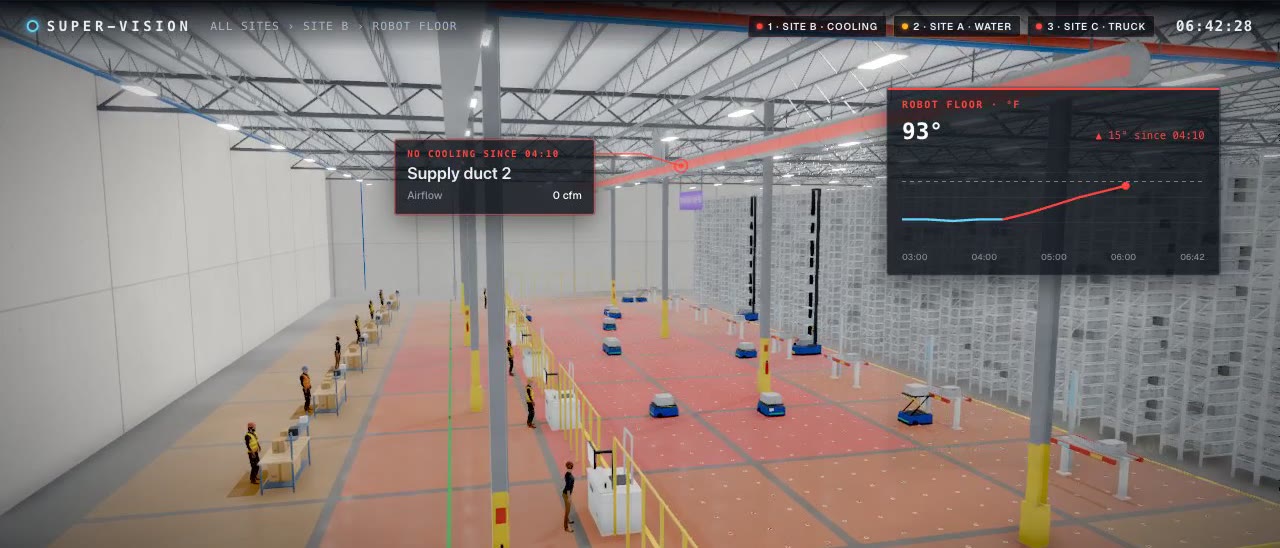
When the work is physical, you can see it. The board opens on every site you run, ranked by what needs you first. Click through to the live twin of the floor, the plant room, the machine. The agent tells you what each problem means in orders, departures, people and money.

Board with three sites ranked by priority
The morning board, three sites, three decisions in order
Robot floor with a heat overlay and a temperature forecast
A cooling unit locks out; the floor is heating and people are on it
The agent

It tells you what to do, and why.

Each advisory names the options, what each one costs, and which the agent recommends. You approve one. It carries it out and reports back when it is done.

How it works

One foundation. People and agents on top.

People and devices feed one operational core. A gateway offers its records and actions to agents as tools. Systems you already run can stay connected.

01 · Input

People and devices

  • Tablets and scanners on the floor
  • Counts, inspections, receipts
  • Sensors and control systems
02 · Foundation

Operational core

  • Stock, orders, assets, maintenance, cost
  • Only the records your workflows need
  • One version of each record
03 · Gateway

Shared tools

  • Business actions offered to agents as tools
  • Built on MCP, the open protocol for agent tools
  • Permissions set per workflow
04 · Agents

Agents and approval

  • Find the issue and weigh the options
  • Prepare the work across teams
  • A person approves what matters
How you adopt it

Start with one workflow. Grow into what comes next.

You do not buy a suite and then bend the business to fit it. Pick the work that hurts most. We set up the records, screens, tools and approvals that workflow needs, and build out from there.

Oil and gas

Production, maintenance, contractors, permits and shipping.

Start withWork permits checked against live operations before they are issued.

Rail

Fleet availability, depot work, crews, parts and service commitments.

Start withCrew gaps filled from qualified standby staff, with rest hours checked.

Manufacturing

Orders, materials, purchasing and production plans across sites.

Start withNew orders checked against stock, capacity and materials before a date is promised.

Cargo fleets

Vessel readiness, crews, stores, maintenance and voyage cost.

Start withPort invoices checked against the contract and the ship's own log.

Pharmacy

Stock, supplier orders, branch operations and revenue across the chain.

Start withShelf counts that turn into approved supplier orders.

Warehousing

Stock, docks, equipment and people across every site.

Start withDeliveries checked against the order, with supplier claims prepared for you.

Facilities

Plant, energy, tenants, contractors and running cost.

Start withTenant requests that turn into a scheduled job and a line on the invoice.
Start with one workflow.

Tell us the work that costs you the most chasing. We will show you how it would run.

Contact us

support@o-zonetechnologies.com

Ozone Technologies · London · Doha